
Introduction
Choosing the right digital tool has become a serious challenge for many people today. New applications are launched every day, and each one promises better speed, more features, and lower cost. Because of this overload, many users feel confused and unsure about what to select. This is where software comparison becomes extremely useful. It helps users clearly understand differences between tools and make confident decisions based on real needs instead of marketing claims.
For beginners, software comparison removes fear and guesswork. It breaks complex features into simple points that are easy to understand. For intermediate users, it saves time by narrowing choices and highlighting strengths and weaknesses quickly. Instead of wasting money on the wrong product, users can invest wisely.
In today’s competitive market, businesses also rely heavily on software comparison before adopting any system. Whether it is accounting software, project management tools, design platforms, or security solutions, comparing options helps avoid costly mistakes. Moreover, it improves productivity because the selected software fits actual workflows.
Another important benefit is transparency. Software comparison focuses on pricing, usability, performance, support, and scalability. This allows users to see the full picture rather than just surface-level benefits. As a result, decisions become more logical and goal-oriented.
This article is designed to guide you step by step through the entire process. Using simple English and practical examples, it explains how software comparison works, why it matters, and how to do it correctly. By the end, you will feel confident comparing tools and selecting the best option for your needs.
What is Software Comparison?
Software comparison is the process of evaluating two or more software tools to identify their differences, similarities, strengths, and weaknesses. The goal is to choose the option that best matches your specific requirements, budget, and skill level.
This process involves analyzing multiple factors rather than focusing on a single feature. For example, one tool may be cheaper but difficult to use, while another may cost more but save time through automation. Software comparison helps balance these trade-offs.
It is commonly used by individuals, startups, and large organizations. Students compare learning tools, freelancers compare design software, and companies compare enterprise systems. In every case, the purpose remains the same: making an informed decision.
Software comparison is not about finding the “perfect” tool. Instead, it is about finding the “right fit.” What works for one user may not work for another. That is why comparisons must always be based on personal or organizational goals.
Why is Software Comparison Important?
Software comparison is important because it reduces risk and increases satisfaction. Choosing software without comparison often leads to wasted money, frustration, and poor performance.
First, it helps users understand value for money. Pricing models vary widely, and hidden costs can appear later. Comparing pricing structures helps avoid surprises.
Second, it improves efficiency. When software aligns with your workflow, tasks are completed faster and with fewer errors. Comparison ensures better alignment.
Third, it supports long-term planning. Some tools work well initially but fail to scale. Software comparison highlights scalability and future readiness.
Finally, it builds confidence. Instead of relying on opinions or ads, users rely on facts. This leads to smarter and more professional decisions.
Detailed Step-by-Step Guide
Step 1: Define Your Needs Clearly
Start by listing your goals. Ask yourself what problem the software should solve. Be specific and realistic.
Consider your skill level, team size, and usage frequency. Clear needs make comparison meaningful.
Step 2: Shortlist Available Options
Research available tools that meet your basic requirements. Avoid listing too many options. Three to five is ideal.
Look for tools with good reputations and active development. This ensures reliability.
Step 3: Compare Core Features
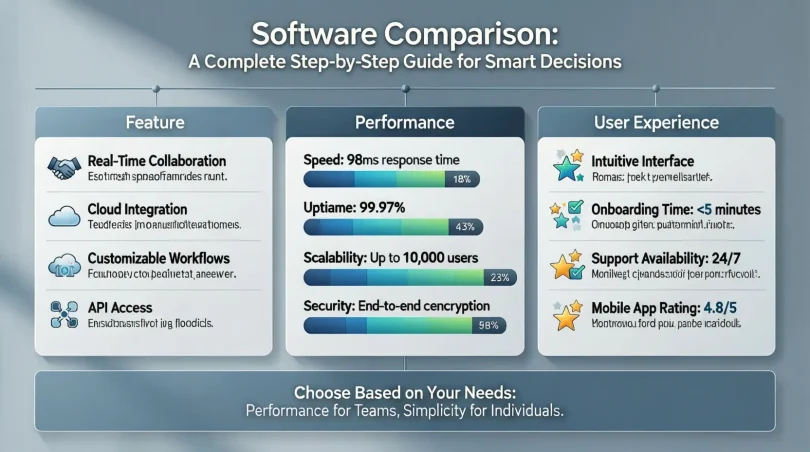
Create a simple table or checklist. Compare essential features side by side.
Focus on what you will actually use, not advanced features that look impressive but remain unused.
Step 4: Evaluate Ease of Use
User experience matters. Software should be easy to learn and operate.
Check interface design, navigation, and learning resources. A complex tool can reduce productivity.
Step 5: Analyze Pricing and Plans
Review free trials, subscription tiers, and upgrade costs. Understand what each plan includes.
Make sure pricing matches your budget and usage level.
Step 6: Check Performance and Reliability
Performance affects daily work. Slow or buggy software creates frustration.
Look for stability, update frequency, and system requirements during software comparison.
Step 7: Review Support and Documentation
Good customer support saves time during problems. Compare support channels like chat, email, or tutorials.
Strong documentation is especially important for beginners.
Step 8: Consider Security and Compliance
Security is critical, especially for business data. Compare encryption, backups, and compliance standards.
This step is often overlooked but very important.
Step 9: Test Before Final Decision
Use free trials or demos. Hands-on experience often reveals issues not visible on paper.
Testing completes the software comparison process effectively.
Benefits of Software Comparison

- Helps save money by avoiding unnecessary features
- Improves productivity through better tool selection
- Reduces learning time with user-friendly options
- Supports long-term scalability and growth
- Increases confidence in purchasing decisions
- Minimizes risk of switching software later
Disadvantages / Risks
- Can be time-consuming if not planned properly
- Too many options may cause confusion
- Biased reviews can mislead decisions
- Over-comparison may delay action
- Ignoring real needs can reduce effectiveness
Common Mistakes to Avoid
One common mistake is focusing only on price. Cheap software may lack essential features.
Another mistake is ignoring future needs. Software that cannot grow with you becomes a problem.
Some users rely only on opinions without testing. This reduces accuracy.
Finally, skipping documentation and support comparison often leads to frustration later.
FAQs
What is the main goal of software comparison?
The main goal is to select software that best fits your needs, budget, and skill level. It helps avoid poor decisions and wasted resources.
How many tools should I compare at once?
Ideally, compare three to five tools. This keeps the process manageable and focused.
Is software comparison useful for beginners?
Yes, it is especially helpful for beginners because it simplifies choices and explains features clearly.
Should I trust online reviews completely?
Reviews are helpful but should not be the only factor. Combine reviews with personal testing.
How often should software comparison be done?
It should be done whenever needs change or before making a new purchase decision.
Can software comparison help businesses grow?
Yes, choosing the right tools improves efficiency, collaboration, and scalability.
Expert Tips & Bonus Points
Always start with clear goals before comparing tools. This keeps the process efficient.
Use simple comparison charts to visualize differences quickly.
Prioritize usability over advanced features you may never use.
Revisit your software comparison periodically as tools and needs evolve.
Involve team members in testing to get practical feedback.
Conclusion
Software selection is no longer a simple task. With countless options available, making the right choice requires careful thinking and structured evaluation. This is why software comparison plays such an important role for both individuals and organizations. It transforms confusion into clarity and replaces guesswork with logic.
By following a step-by-step approach, users can break down complex tools into understandable elements. Defining needs, comparing features, analyzing pricing, and testing software ensures that decisions are based on real requirements. This process not only saves money but also improves daily productivity and long-term satisfaction.
For beginners, software comparison builds confidence and reduces fear of making mistakes. For intermediate users, it sharpens decision-making skills and supports growth. Most importantly, it encourages smarter digital habits by focusing on value rather than hype.
In a fast-changing digital world, tools will continue to evolve. However, the method of comparing them wisely will always remain valuable. By applying the principles explained in this guide, you can confidently choose software that supports your goals, fits your workflow, and delivers lasting benefits.