
Introduction
Cloud computing Explained has changed the way people and businesses use technology. Instead of storing data on personal computers or local servers, users can now access information, software, and services through the internet. This modern approach makes technology more flexible, affordable, and powerful for everyone. From students using online storage to companies running large applications, cloud computing plays a key role in daily digital life.
In simple words, cloud computing allows you to use computing resources without owning them physically. You can store files, run applications, and manage systems online. This means less hardware, lower costs, and better performance. As internet access becomes faster and more reliable, cloud computing continues to grow rapidly across the world.
For beginners, cloud computing may seem complex at first. However, once the basics are clear, it becomes easy to understand and use. Intermediate users can also benefit by learning how cloud systems work, how to choose services, and how to avoid common mistakes. Cloud computing supports innovation, remote work, online learning, and digital businesses.
This guide explains cloud computing in simple English. It covers key concepts, step-by-step processes, benefits, risks, and expert tips. Whether you are a student, professional, or business owner, this article will help you understand cloud computing clearly and confidently.
What is Cloud Computing?
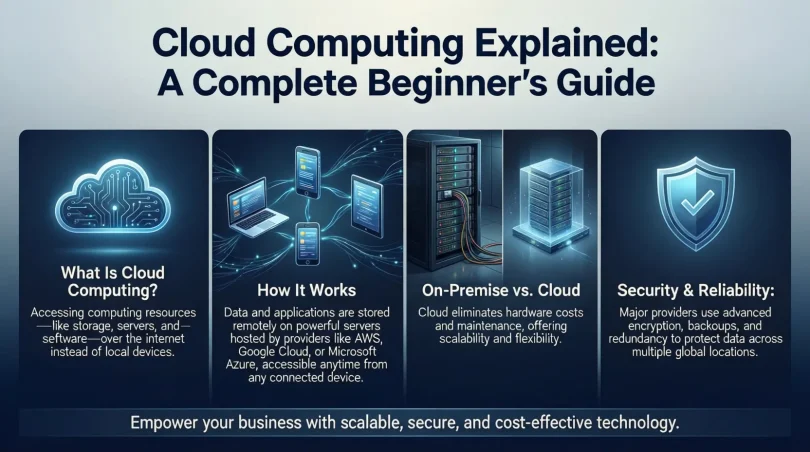
Cloud computing is the delivery of computing services over the internet. These services include storage, servers, databases, software, networking, and analytics. Instead of buying and maintaining physical systems, users access these resources online when needed.
In cloud computing, data is stored in remote data centers. These data centers are managed by service providers and can be accessed from anywhere using the internet. Users only pay for what they use, making cloud computing cost-effective and scalable.
There are three main components of cloud computing. The first is infrastructure, which includes virtual servers and storage. The second is platforms that allow developers to build and test applications. The third is software that users access through browsers without installing it locally.
Cloud computing supports both personal and professional use. Email services, online storage, video streaming, and business tools are common examples. Because of its flexibility and efficiency, cloud computing has become an essential part of modern technology.
Why is Cloud Computing Important?
Cloud computing is important because it simplifies technology use. It removes the need for heavy investments in hardware and maintenance. This allows individuals and organizations to focus on their main goals instead of managing systems.
One major reason cloud computing matters is accessibility. Users can access data and applications anytime and from any device. This supports remote work, online education, and global collaboration. Teams can work together easily without being in the same location.
Another key importance is scalability. Cloud computing allows users to increase or decrease resources based on demand. This is helpful during busy periods or business growth. There is no need to buy extra hardware in advance.
Cloud computing also improves reliability. Data is backed up across multiple servers, reducing the risk of loss. In addition, cloud providers offer strong security measures to protect information. Overall, cloud computing helps users save time, reduce costs, and improve efficiency.
Detailed Step-by-Step Guide
Step 1: Understand Your Needs
Before using cloud computing, identify your goals. Decide whether you need storage, software, or computing power. This clarity helps you choose the right services.
Step 2: Choose a Cloud Service Model
Cloud computing offers different service models. Infrastructure as a Service provides basic resources. Platform as a Service supports application development. Software as a Service delivers ready-to-use applications.
Step 3: Select a Deployment Type
There are public, private, and hybrid clouds. Public clouds are shared and cost-effective. Private clouds offer more control. Hybrid clouds combine both options.
Step 4: Create an Account
Sign up with a cloud provider. Set up your account using secure credentials. Choose plans based on your usage needs.
Step 5: Upload Data or Applications
Move your files or applications to the cloud. Use secure tools provided by the service. Test access and performance after migration.
Step 6: Manage and Monitor Usage
Monitor your cloud usage regularly. Adjust resources as needed. This helps control costs and maintain performance.
Step 7: Ensure Security and Backup
Enable security features such as encryption and access control. Set up regular backups to protect your data.
Benefits of Cloud Computing

- Reduces hardware and maintenance costs
- Provides easy access from anywhere
- Offers high scalability and flexibility
- Improves data backup and recovery
- Supports collaboration and remote work
- Saves time through automation
- Enhances performance and speed
Disadvantages / Risks
- Requires stable internet connection
- Data security concerns if mismanaged
- Limited control over infrastructure
- Possible downtime from service outages
- Ongoing subscription costs
- Compliance and privacy challenges
Common Mistakes to Avoid
Many users make mistakes when starting with cloud computing. One common error is not understanding pricing models. This can lead to unexpected costs. Always review pricing details carefully.
Another mistake is ignoring security settings. Users often rely only on providers for protection. It is important to configure passwords, permissions, and backups properly.
Some users move everything to the cloud without planning. This can cause performance issues. Start with essential data and expand gradually. Avoid choosing services without comparing features.
FAQs
What is cloud computing in simple words?
Cloud computing means using online servers to store data and run applications instead of using your own computer.
Is cloud computing safe?
Yes, cloud computing is safe when proper security measures are used. Providers offer encryption and protection tools.
Who uses cloud computing?
Students, businesses, developers, and organizations of all sizes use cloud computing for various purposes.
Can cloud computing reduce costs?
Yes, cloud computing reduces costs by eliminating hardware expenses and offering pay-as-you-use pricing.
Do I need technical skills to use cloud computing?
Basic cloud services require minimal skills. Advanced use may need technical knowledge.
What happens if the internet fails?
Without internet access, cloud services may be unavailable. Offline backups can help in such cases.
Expert Tips & Bonus Points
Start small and learn gradually. Always track usage to manage costs. Use strong passwords and multi-factor authentication. Keep data organized and updated. Regularly review service performance and security settings. Learn basic cloud terms to communicate better with providers.
Cloud computing works best when aligned with clear goals. Use automation tools to save time. Stay updated with new features and best practices. With proper planning, cloud computing can greatly improve productivity and growth.
Conclusion
Cloud computing has become a foundation of modern digital life. It offers flexibility, efficiency, and accessibility that traditional systems cannot match. By using cloud computing, individuals and businesses can store data, run applications, and collaborate easily without heavy investments.
For beginners, understanding the basics of cloud computing opens new opportunities. Intermediate users can improve performance and scalability by applying best practices. While there are risks, proper planning and security measures can reduce them effectively.
As technology continues to evolve, cloud computing will remain a key driver of innovation. Learning how to use it correctly is a valuable skill. With the right approach, cloud computing can support growth, creativity, and success in a digital world.